 100% safe &
clean
100% safe &
clean
7,342,376 people have downloaded
 Free Instagram followers & likes
100% real Instagram followers
No risk, no punishment and no worries
Personal information boundaries frequently become blurred in a data-driven age. Obviously, not everyone is comfortable with such attention at the cost of privacy.
Among other things, our followers, posts and the photos we like - all of this information is available to other Instagram users. Sometimes it could be a problem, and you may wish to hide these listings.

In that case, it also provokes thinking, is it possible to hide followers on Instagram? How to hide followers on Instagram?
 Content
 Can You Hide Your Followers on Instagram?
How to Hide Followers on Instagram
FAQs on Hide Followers in Instagram
[Bonus part] How to Increase Followers on Instagram Free & Fast
Can You Hide Your Followers on Instagram?
How to Hide Followers on Instagram
FAQs on Hide Followers in Instagram
[Bonus part] How to Increase Followers on Instagram Free & Fast
Instagram, one of the largest platforms for creating, flowing, and sharing information, also has several settings to protect users' privacy. However, unfortunately, no button on Instagram can hide followers in one click.
So can you hide your following list on Instagram? The truth is not entirely; the number of followers you have and the number of people following you on your Instagram profile is still visible. However, there are some other adaptations you can make to choose who sees what.
As mentioned above, even though you can't completely hide followers on Instagram, other ways still exist to restrict users from viewing your followers list, thereby promoting your privacy. 3 alternatives are delivered in the following content. Read on to find out which solution works best for you.
1. Private account
When your account becomes private, your follower list is only visible to followers, along with your posts and stories. Next are steps on how to hide followers in Instagram by private account.
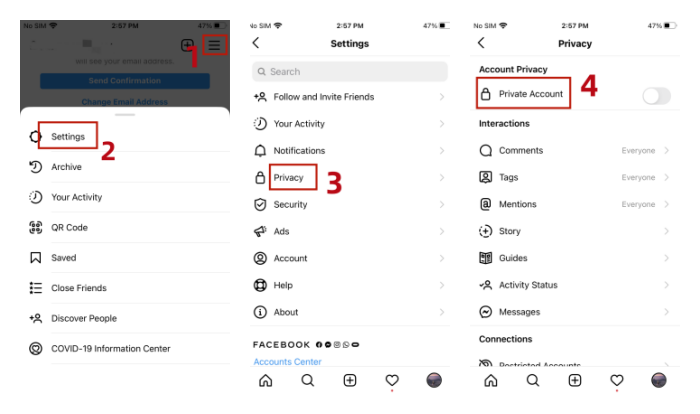
Step 1. Open Instagram and tap the profile icon.
Step 2. Click the three horizontal lines and select Settings.
Step 3. Then tap Privacy.
Step 4. Move the slider next to Private Account.
2. Remove a person
Once you have set your account to private, only your followers can see the follower list. But if there is still someone you aren't willing to share messages with, you can remove them from the follower list. Next are steps on how to hide followers on Instagram by removing a person.
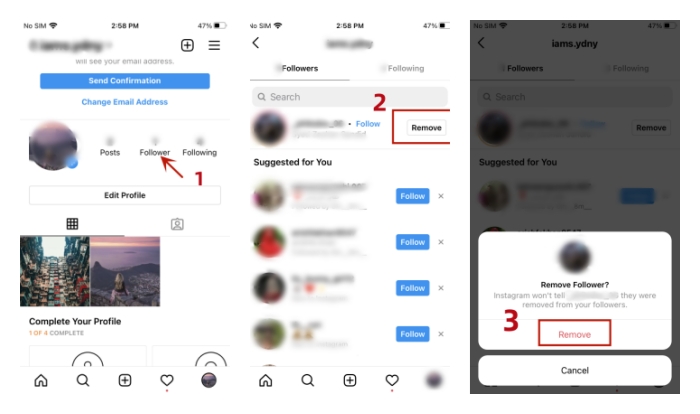
Step 1. Go to your profile and click on the list of followers.
Step 2. Tap Remove next to the person you want to remove.
Step 3. Tap Remove again to confirm your choice.
3. Block a person.
If a follower is blocked, that person can only see your followers count but has no access to specific followers' information. So block could be a perfect choice if you merely want to hide followers from a particular person or a bunch of folks. Next are steps on how to hide followers on Instagram by blocking them.
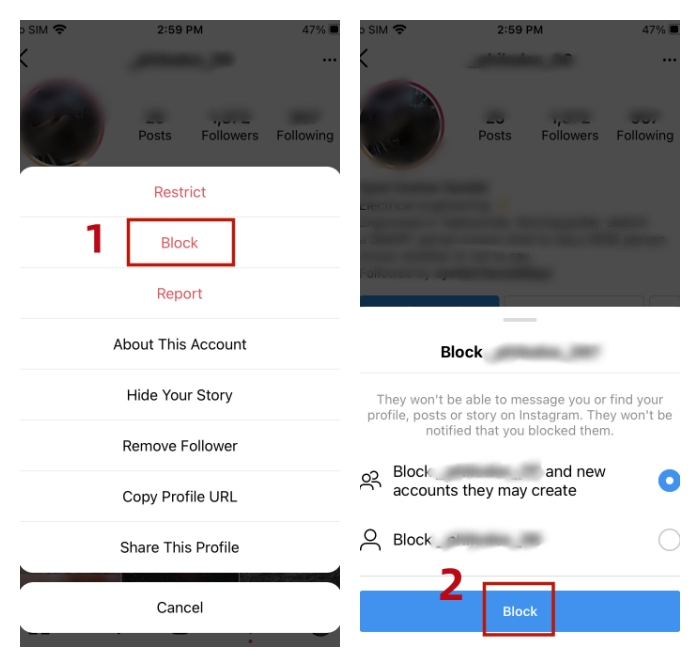
Step 1. Go to the profile of the person you intend to block.
Step 2. Click on the three dots icon on the upper right.
Step 3. Tap Block and confirm the action again.
1. Can I hide my activity status on Instagram?
Yes, you can go to Profile and tap the three horizontal lines in the top right-hand corner. Select Settings > Privacy > Activity Status, and switch Show Activity Status off. Moreover, you also turn off the switch to see others' last active status.
2. Can I hide Instagram likes in my published posts?
Yes, you can first find the post you want to hide the likes on, then click on the three dots in the top right-hand corner and tap Hide like count.
3. What’s the difference between removing and blocking someone?
When you block someone, it means they are barred from following you or viewing your profile page.
However, when you remove someone from your followers list, they can still access your profile and react to your posts.
While there isn't a magical button that allows you to hide followers on Instagram directly, the three methods above can effectively protect your privacy. In addition, you should note that setting your account to private will subsequently affect the followers counts you get. If you want to use growth tips and tools to keep it on a positive trajectory, here's a free tool - GetinselfGetInstaIns Followers to boost your followers organically.
Forever free & unlimited followers, with coins.
Unlike other follower increasers that only offer a free trial, GetinselfGetInstaIns Followers provides a perpetual free follower growth service, something GetinselfGetInstaIns Followers is committed to doing. Thanks to the coin exchange mechanism, once you have acquired sufficient coins, you can exchange them to get free Instagram followers!
Real & active Instagram followers, no bot.
This Instagram followers generator only provides real and active followers, shielding you from the penalties of the Ins algorithm due to bot followers surge, allowing your following to increase organically and rapidly in the shortest possible time.
100% safe & private, without registration.
GetinselfGetInstaIns Followers value users' perception and personal privacy. As there is no essential personal information to access or tie up, you don't have to worry about the risk of data leakage. Plus, it is handy to use, which could be the easiest and safest approach to hack Instagram followers 10k free.
Step 1. Click on the Download below and install it on your phone.
Step 2. Sign up and log into your account. (PS: GetinselfGetInstaIns Followers supports 5 accounts to log into at most)
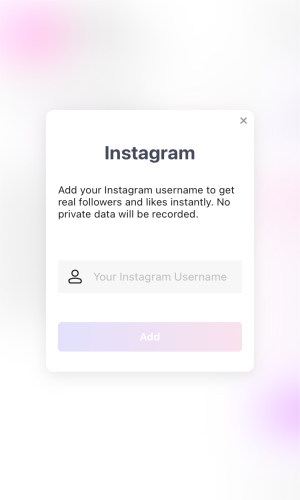
Step 3. Earn Instagram followers with unlimited coins. You can collect coins by completing some missions like lucky draws, daily logins or sharing the App with others.
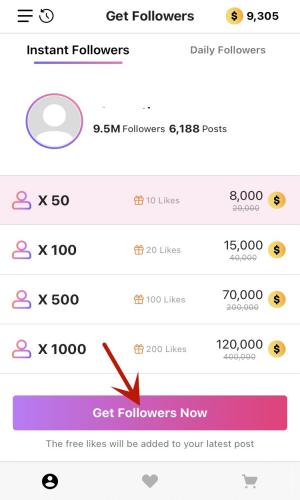
Get this Instagram followers app and see how the magic occurs.
How to hide followers on Instagram? 3 simple ways to enhance your privacy are provided in this post. You can adopt the appropriate measures according to your specific needs.
Besides, there is also a bonus part of expanding your Ins followers base free with an intuitive tool. GetinselfGetInstaIns Followers, offering a permanently free service with no personal information requested, is safe to download and use. It could be your first pick to boost the free Instagram followers and presence. No costs and more efficiency. Just download it and give it a try.
100% safe &
clean
7,342,376 people have downloaded


 Recommend reading
How to Get Daily 100 Free Instagram Followers Fast Trial? [Solved]
Recommend reading
How to Get Daily 100 Free Instagram Followers Fast Trial? [Solved]
 100K+ Views
 The article that has viewers at any time
9 Latest Insta Followers Pro iOS & APK Free Apps Download
100,457 Views
The article that has viewers at any time
9 Latest Insta Followers Pro iOS & APK Free Apps Download
100,457 Views
 The article that is highly rated by users
Top 10 Instagram Followers Increase Apps & Fake Followers Apps [Updated]
9,0798 Views
The article that is highly rated by users
Top 10 Instagram Followers Increase Apps & Fake Followers Apps [Updated]
9,0798 Views
 The article that has the most views
10 Best Instagram Likes Apps to Get Real Likes on Instagram l 2023
5,670 Views
The article that has the most views
10 Best Instagram Likes Apps to Get Real Likes on Instagram l 2023
5,670 Views
 100K users's choice
Best 10 Instagram Hack Followers and Likes APKs [Latest]
9,070 Views
100K users's choice
Best 10 Instagram Hack Followers and Likes APKs [Latest]
9,070 Views
Add your username to get free followers now!
